Maintenance and field service platform
From fault report to service history, all your maintenance in one place.
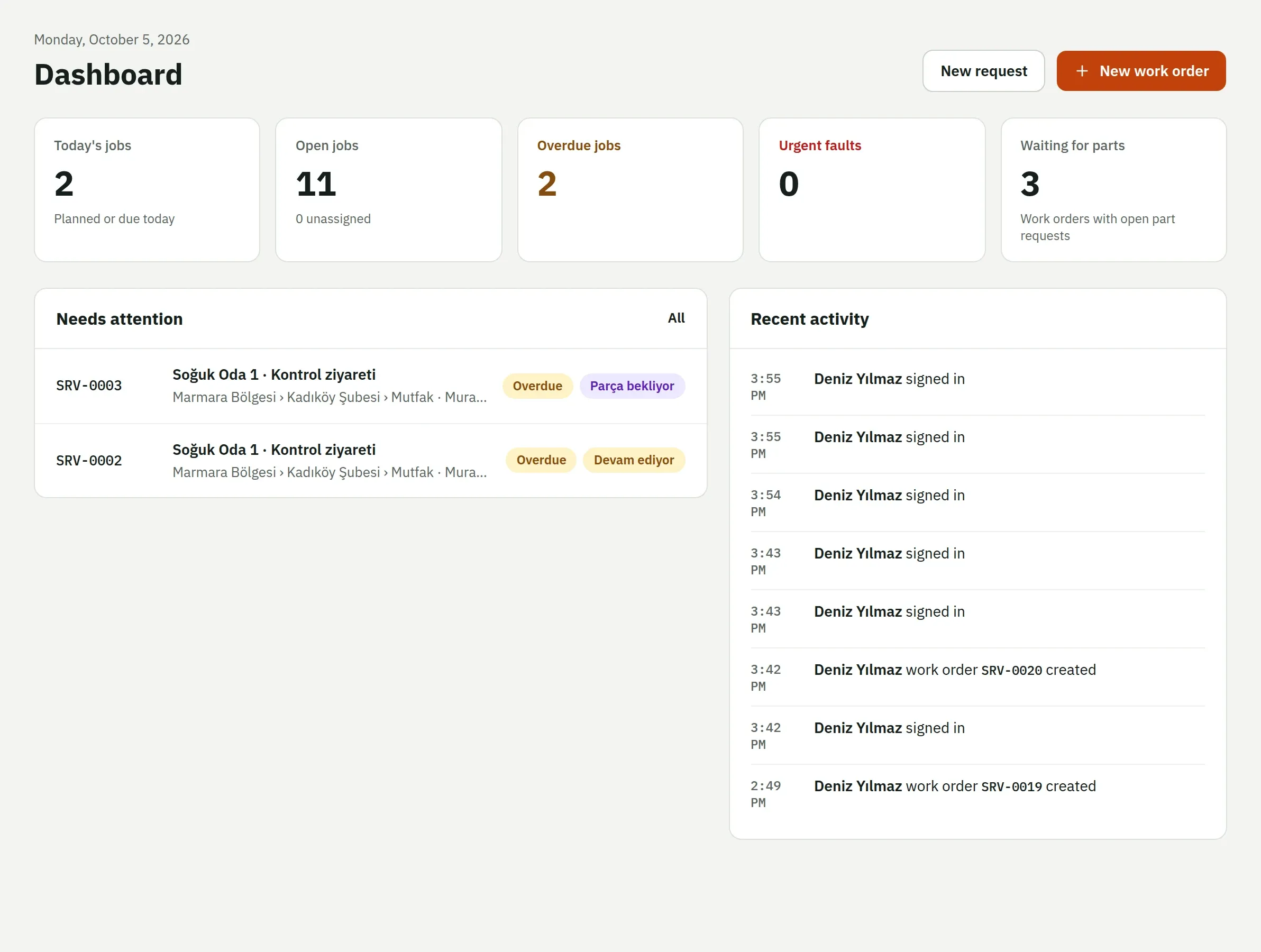
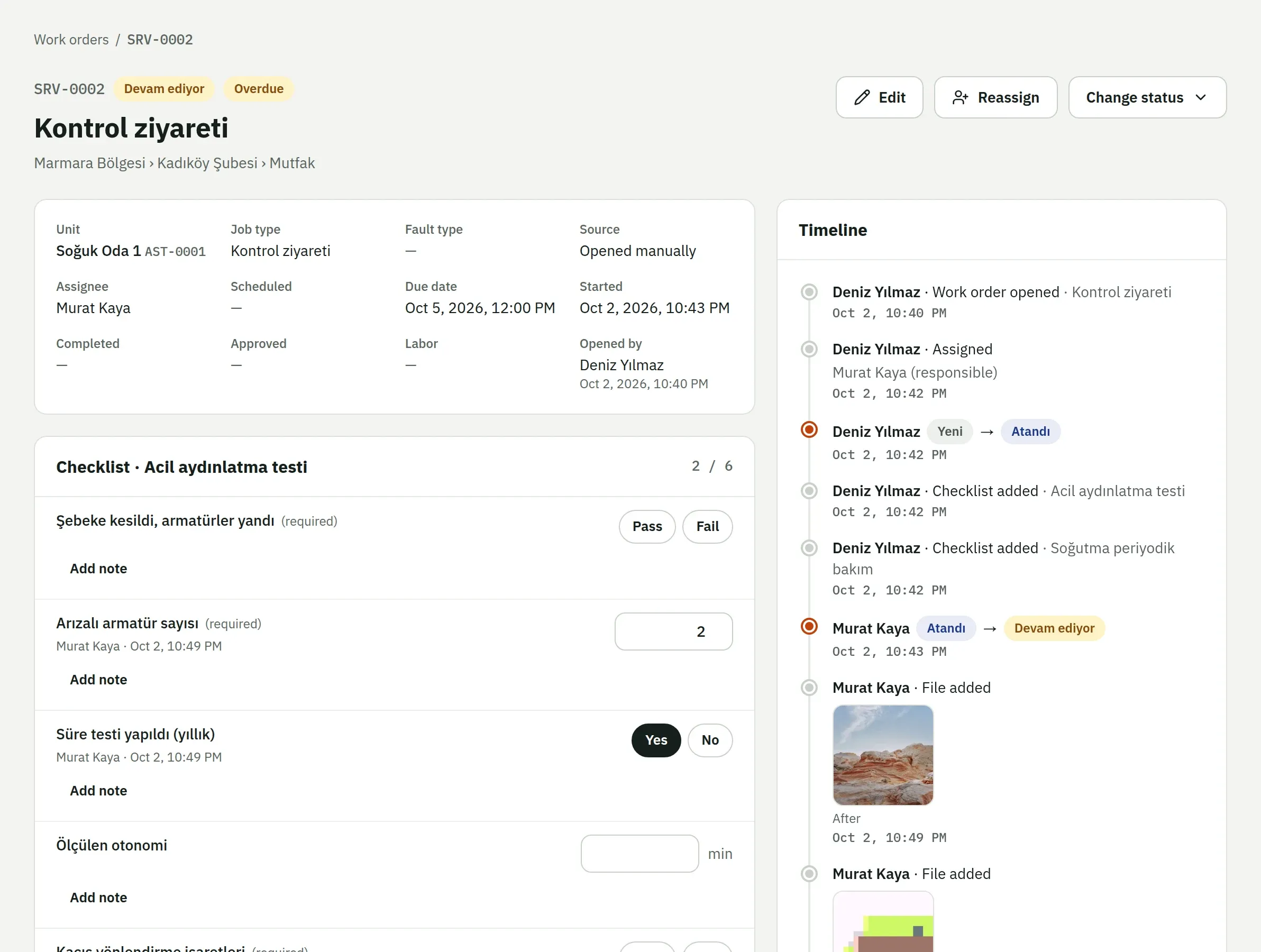
Branch staff scan the QR code on the equipment to report a fault. The request becomes a work order, and the technician fills in the checklist on their phone, enters readings, takes photos, requests parts and closes the job. Managers see who did what, and when, on the web.
First 2 months free, no card needed
Web, iOS and Android. Turkish and English.
How it works
The life of a fault: seven steps from label to service history
- 01
Sites and assets
Region, branch, floor or customer site, with equipment and sub-assets under it.
- 02
QR label
A random code for every asset and site. Labels print from an A4 or roll PDF.
- 03
Request
A fault reported by staff or through the QR page waits for a manager's review.
- 04
Work order
An SRV number, priority, due date and an assigned technician or team.
- 05
Work on site
Checklist, readings, notes, photos and part requests, with or without a signal.
- 06
Completion
A job can't be finished while required items, photos or part requests are still open.
- 07
Service history
Every work order, request, log entry and change for the asset on one timeline.
Features
Built for the people who do the work
QR fault reporting
Reporting a fault needs no app and no account
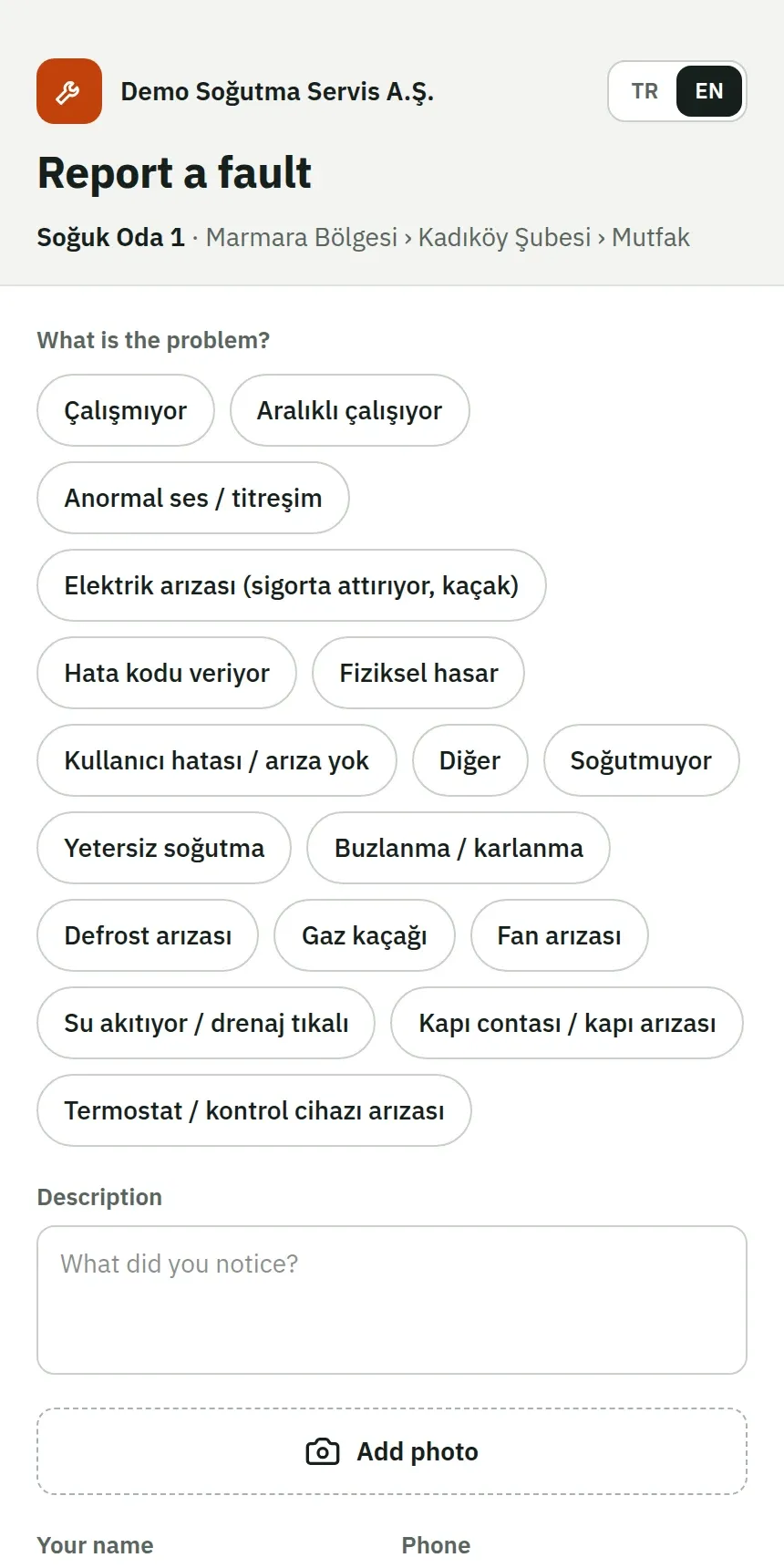
Anyone who scans the label on the equipment with a phone camera gets a short page: pick the fault type, describe what you saw, add up to three photos. Name and phone are optional. The report arrives as a request, not a work order; a manager reviews it, turns it into a work order or rejects it with a reason. The reporter follows its status through a tracking link.
- Fault types come from your sector template: “Not cooling”, “Refrigerant leak”, “Not heating”…
- You decide how much the page shows: just the asset name, or the name and its location.
- The code is random and carries no asset number. If a label is lost, rotate the code and the old one stops working.
A technician app that works offline
Work keeps going in the basement, the cold room and the dead zone
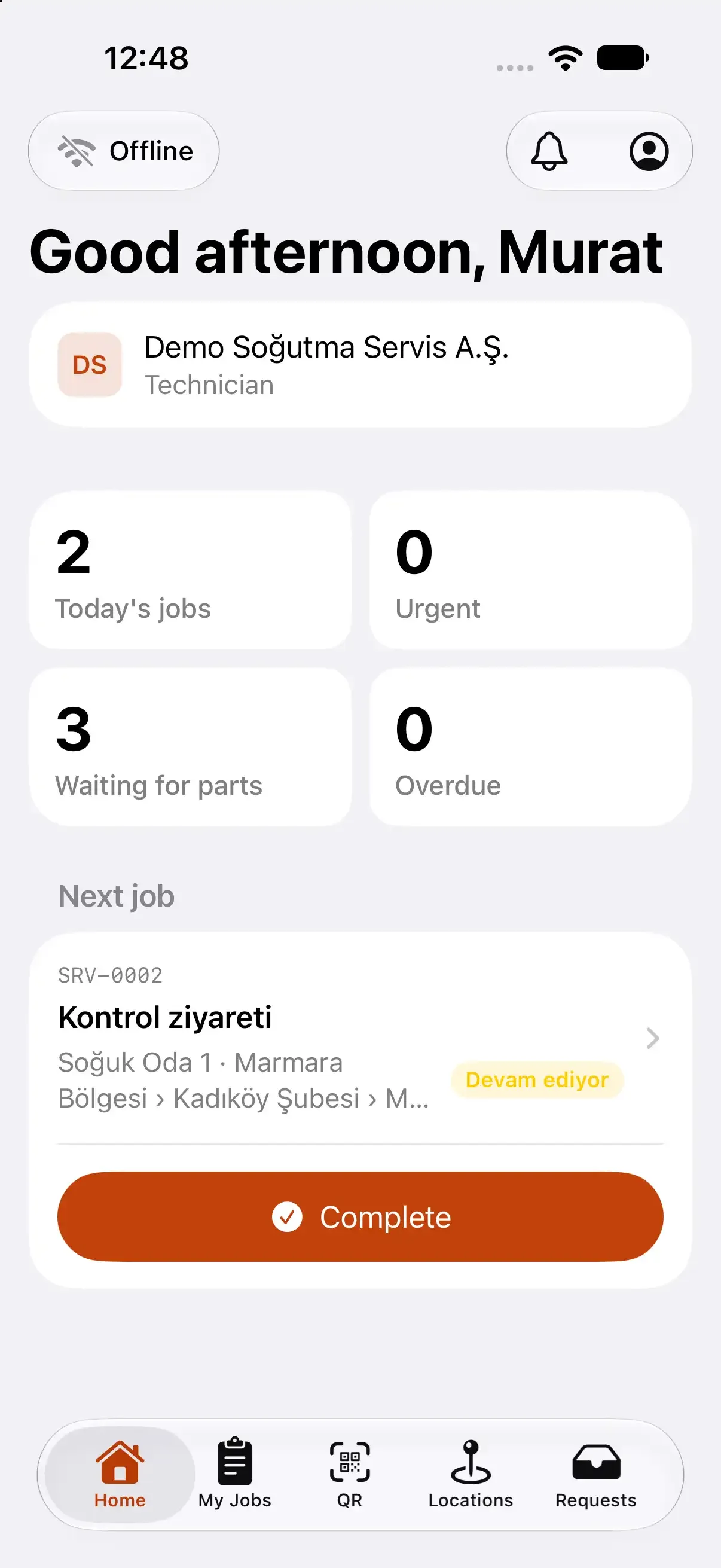
The iOS and Android apps keep the jobs assigned to a technician and their team on the phone. Without a connection they can start a job, fill in the checklist, enter readings and notes, take photos, request parts and complete the job. Every change is queued and sent in order once the connection is back.
- An indicator at the top of the screen always shows how many changes are waiting.
- The server has the final say: a change to a job that was cancelled in the meantime is rejected, and the app shows why.
- Photos are resized, stripped of location and EXIF data, and uploaded from their own queue.
Checklists with measurements
Not “checked”, but the value you measured
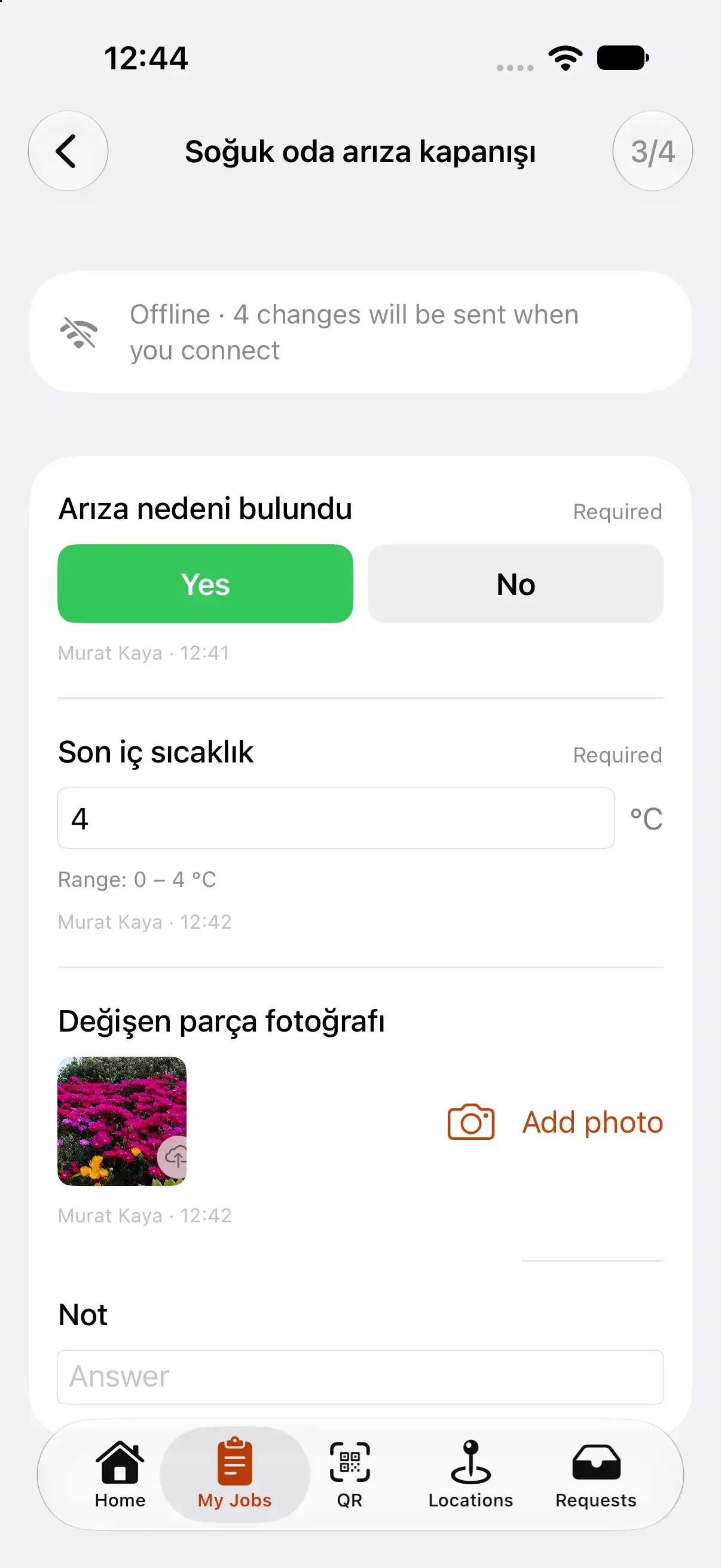
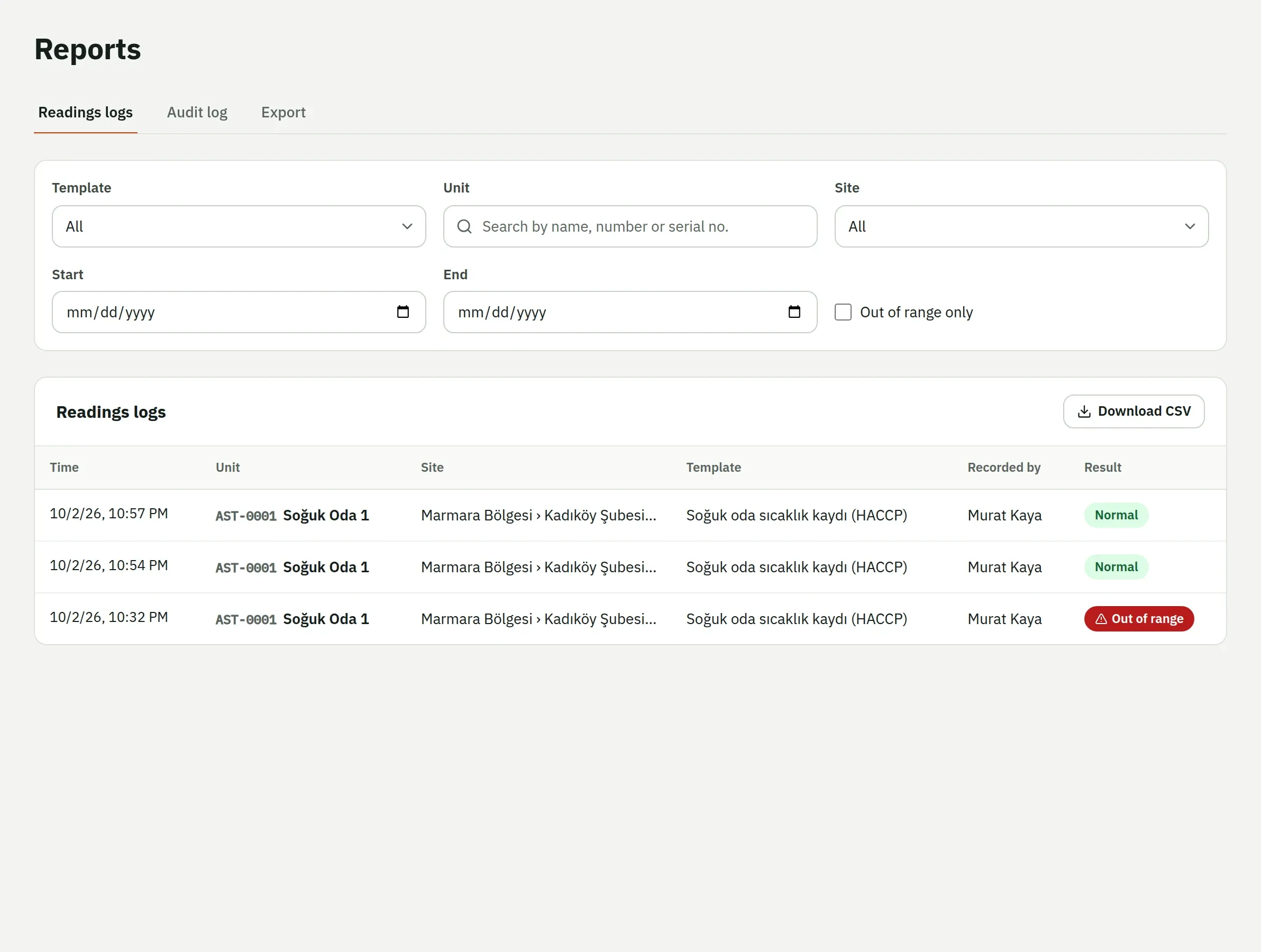
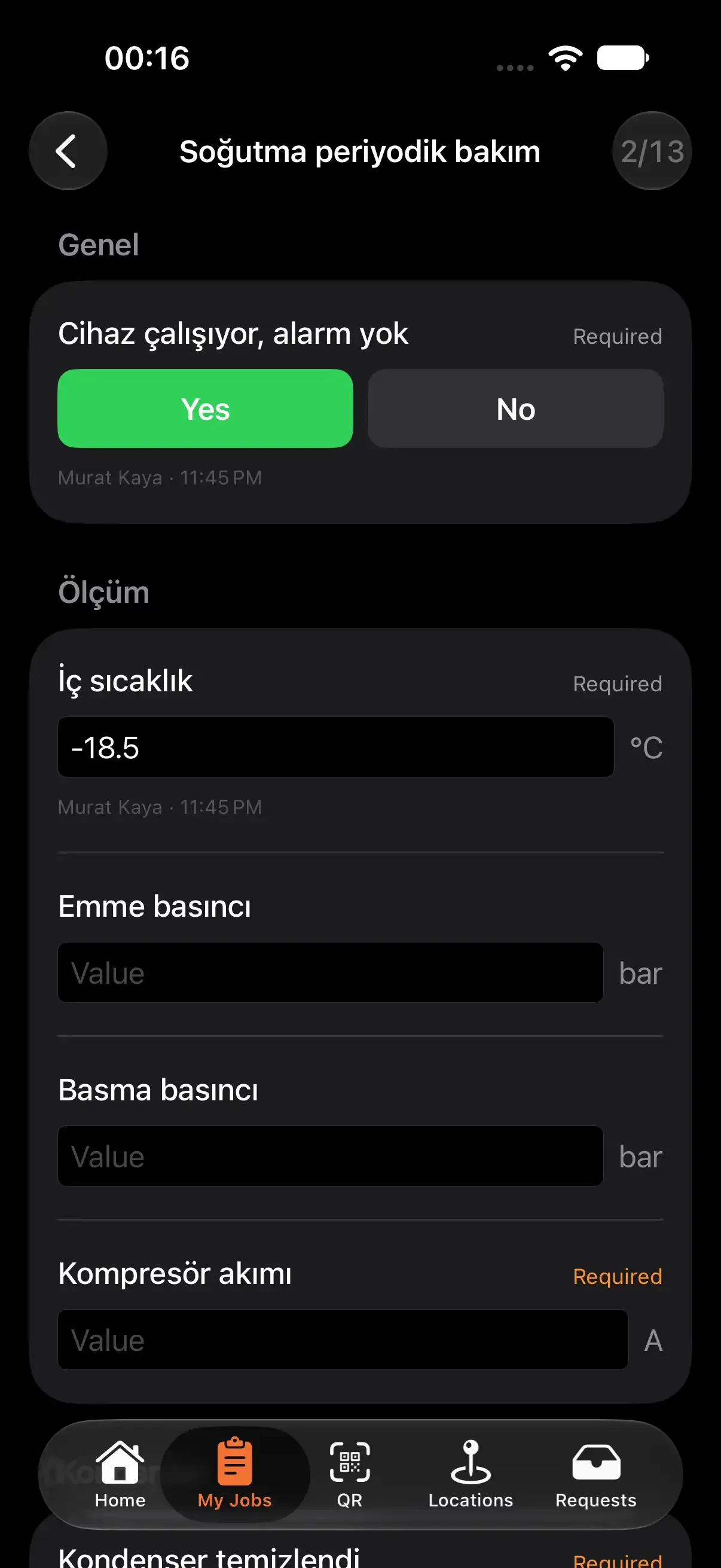
Checklist items can be yes/no, pass/fail, a number, a choice, text, a photo or a measurement with a unit. Give a measurement a lower and upper limit and an out-of-range value is flagged at once. Readings logs work without a work order: a regular record like a cold room temperature shows as overdue when it is late, and an out-of-range value can open a request on its own.
- Required items and items that need a photo are marked separately.
- Sector templates come with ready checklists: refrigeration preventive maintenance, F-gas leak check, HACCP temperature log…
- Readings logs filter by date, asset and out-of-range, and download as CSV.
Part requests and completion rules
Unfinished work can't be closed as “done”
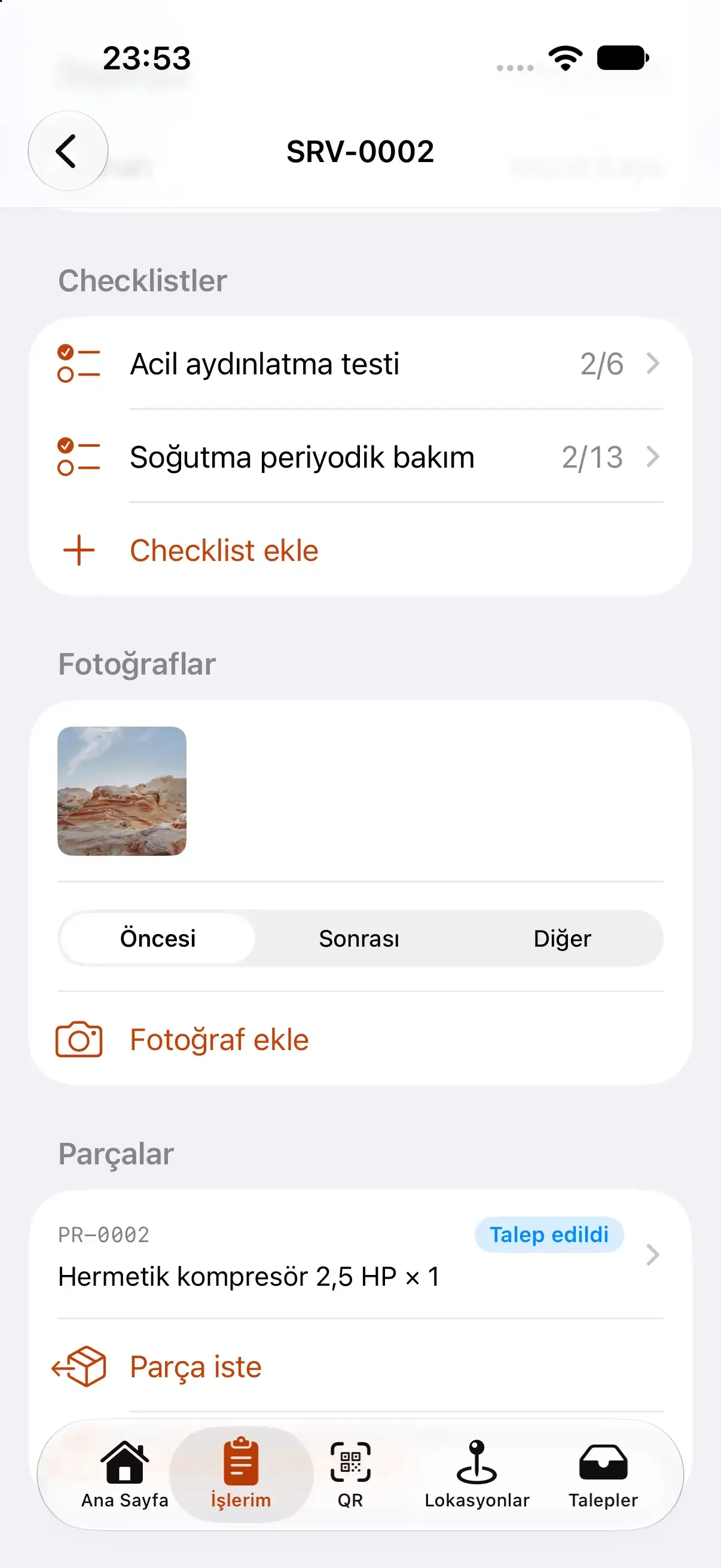
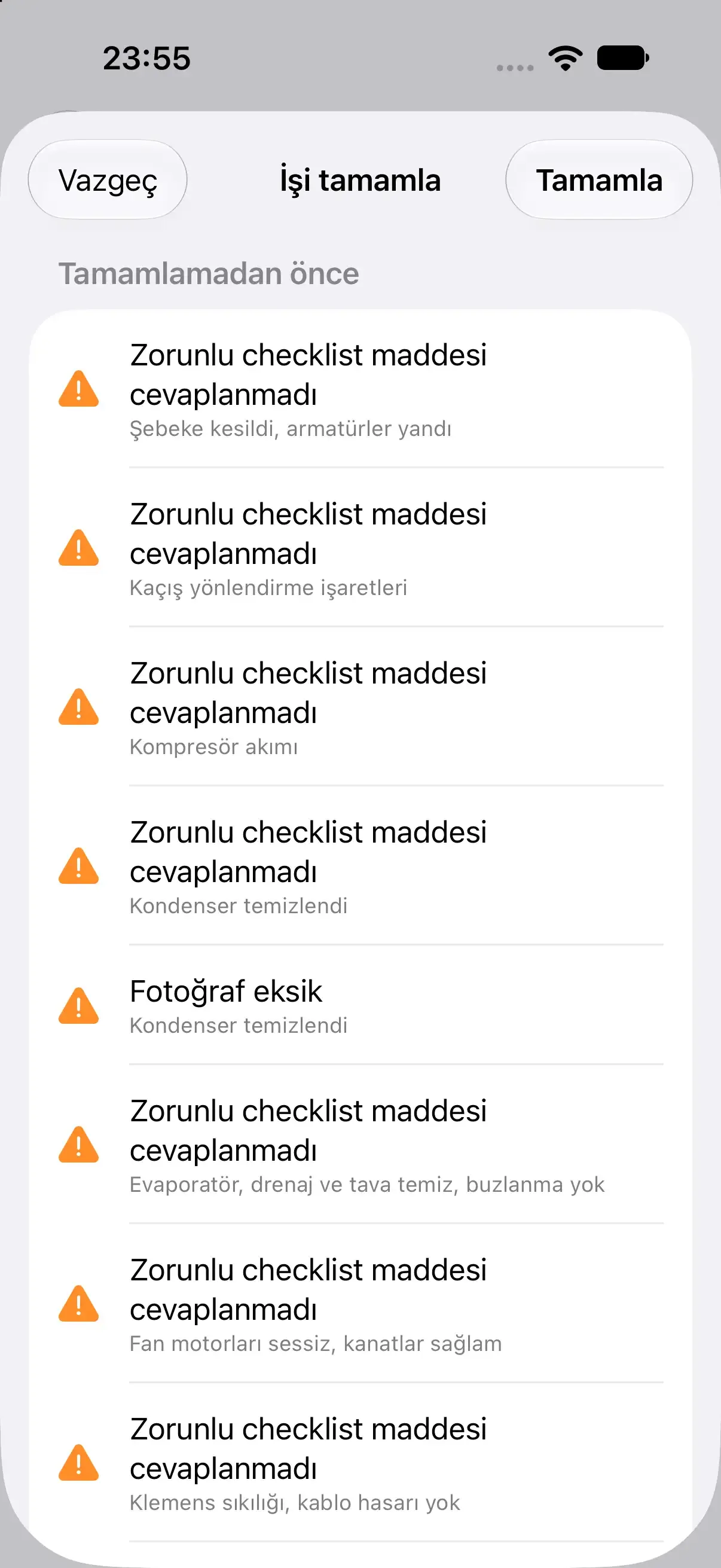
Technicians request parts from inside the work order, from the catalog or as free text, with quantity and urgency. The request is approved, prepared, handed over and used, and every step is recorded. When they try to close the job, Saha lists exactly what is missing: unanswered required items, missing photos, open part requests.
- Completion rules are organization settings, and each is on by default.
- If you like, an open part request puts the job on “Waiting for parts” and hands it back to work when the part is handed over.
- Work order statuses use your own names inside fixed categories.
Service history for every asset
Who did what, and when, without anything erased
A work order's timeline lists creation, assignment, status changes, checklists, notes, photos and parts in order; events are never edited or deleted. The asset's history merges those work orders, requests, readings logs and record changes, newest first. The next technician at the unit knows what happened before.
- Work orders, assets, part usage and readings logs export to CSV.
- The audit log shows who changed which record.
- 60 days, every featureQR reporting, work orders, the offline technician app, checklists, maintenance plans. No technician limit during the trial.
- We don't ask for a cardNothing is charged automatically when the trial ends; paying is your decision.
- Then pick your planPer organization, not per user: from $29 a month. If you don't pick one, your data is not deleted.
For the rest of the team, too
Several companies, real roles
One account works across several organizations. Roles belong to each organization, permissions are checked on the server with every request, and a user can be limited to their own sites.
Your data stays yours
Every record belongs to one organization and is separated in the database with row-level security. Another company's records simply don't exist for you.
Notifications
A job assigned to you, an urgent fault request, a part request approved or rejected, a job completed: a push notification on the phone and a bell on the web. Overdue jobs arrive as one summary each morning.
Turkish and English
The web app, the mobile apps and the QR page speak both languages. Everyone picks their own.
Export
Work orders, assets, part usage and readings logs download as CSV. Your data is yours.
Web, iOS and Android
Manage on the web, work from the phone. Each app is built to look and feel native on its platform.
Sector templates
Pick your sector, start ready
Pick a sector and its asset types, custom fields, fault types, measurement types, part categories and checklists are copied into your account. Change any of it to fit your work, and pick more than one sector if you need to.
Refrigeration
Cold rooms, display cabinets, condensing units, racks. Refrigerant, charge, CO₂ equivalent, EKOMVET fields and an F-gas leak check list.
HVAC
Splits, VRF, air handling units, chillers. Filters, supply and return air temperatures, pressure readings.
Electrical
Switchboards, earthing, power factor correction, lighting. Insulation and earth resistance, RCD tests.
Generator / UPS
Checklists and readings for load tests, battery voltage, fuel level and transfer time.
Commercial kitchen
Combi ovens, dishwashers, hoods, suppression systems, gas detection, plus a HACCP temperature log.
General technical service
Machines, pumps, compressors, pressure vessels, forklifts. A pre-use operator check and a general maintenance checklist.
What Saha is not
Saha is not an ERP. There is no accounting, customer ledger, invoicing, payroll, full inventory or sales module. It does maintenance and service work well and leaves the rest to the systems you already use.
Frequently asked questions
What can the technician app do without internet?
Open jobs assigned to them and their team, start work, fill in the checklist, add readings, notes and photos, request parts and complete the job. These are queued and sent when the connection returns. Reassigning, approving and changing settings need a connection.
Does someone reporting through a QR code need to install an app?
No. The phone camera reads the label and a short form opens in the browser. No account is needed, and name and phone are optional. The form is protected against abuse with Cloudflare Turnstile and rate limits.
How is each company's data kept apart?
Every record belongs to one organization and is separated with PostgreSQL row-level security. Each request sees only the data of the organization you are signed in to; asking for another organization's record returns “not found”.
Can I export my data?
Yes. Work orders, assets, part usage and readings logs download as CSV and open in Excel and other tools.
How much does Saha cost?
The first 2 months are free and no card is asked for. Then the organization picks one plan: Starter (up to 5 technicians) $29 a month, Team (up to 20 technicians) $79 a month, Business (unlimited technicians) $199 a month. Paying yearly costs less. Pricing is not per user.
Is Saha an ERP or accounting software?
No. Saha runs maintenance and field service work. There is no accounting, customer ledger, invoicing, payroll, full inventory or CRM, and there won't be; Saha talks to those systems through integrations.
Where do I download the apps?
The web app works in your browser today. The iOS and Android apps are not on the App Store or Google Play yet; we will announce them on this page when they are.
From the blog
All postsQR fault reporting for branches: no app, just a phone camera
A practical guide to letting branch staff report faults from a QR label on the unit: labelling, the form, photos, tracking and turning reports into work orders.
How to build a preventive maintenance checklist with measurements
A checklist that actually tells you something: the right item types, min/max limits, required and photo items, and what happens when a reading is out of range.
Refrigeration temperature logs and F-gas records in Turkey: a practical guide
Temperature logs for cold rooms and cabinets, F-gas leak check intervals, EKOMVET and the 30 working-day rules, with links to the Turkish regulations.
Leave paper and group chats behind
Set up your organization, pick your sector and print your first QR labels today. First 2 months free, no card needed.